If you want to SEO-optimize an existing website, you usually face the same problem: the list of possible actions is endless, the available time isn't. Where do you start? With the home page, the blog, the product pages? With title tags or page speed? With the old theme nobody understands anymore? This post breaks the chaos into a concrete on-page plan. It sorts the work by page type, lists the eleven fields that count per page, and shows a 6-step routine that gets a 30-page site cleanly through in four to six weeks.
Why "optimize the website" is too vague
"We want to SEO-optimize our website" is one of the most frequent briefs agencies and freelancers hear. And one of the vaguest. A site is never a single object. It consists of a home page, service or product pages, blog posts, location pages, a contact page, a legal notice, a privacy policy, terms, possibly a login. Each of these page types has a different purpose, a different audience, a different optimization logic.
Anyone painting them all with one brush (for example "every page needs 1,500 words", or "every page needs Article schema") produces more harm than good. A contact page with 1,500 words of marketing copy will be read by nobody. Article schema on a product page confuses Google. The right question isn't "how do I optimize my website", but "how do I optimize each page type of this site, and in what order".
The pillar post on SEO optimization rolls out the over-arching five-pillar logic (on-page, technical, content, off-page, local). This post focuses on the on-page pillar because it's the fastest and biggest lever for most existing sites. Anyone wanting the big picture of Google visibility and the suite behind it finds the overview on the home page.
Four page types, four optimization logics
Before you jump into editing, the sorting work pays off. Which pages exist, which types do they fall into, what's each type's purpose?
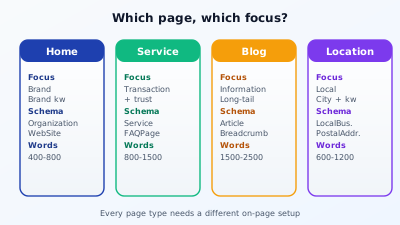
Home page. It's the brand business card. Here you primarily optimize for your brand name and one or two generic industry terms ("tax advisor Munich", "web design agency Cologne"). Schema: Organization or LocalBusiness plus WebSite (with a potential SearchAction for the internal search). Word count: 400 to 800 is enough, because the home page is a navigation hub, not a long-read.
Service or product pages. They're the conversion machines. One page per service with its own main keyword. Schema: Service or Product plus FAQPage (for the most common questions right at the end of the page). Word count: 800 to 1,500 depending on complexity. Every word counts here because the searcher is moments from a decision.
Blog posts. They're the traffic magnets. One clearly defined search intent per post, one long-tail question. Schema: Article plus BreadcrumbList. Word count: 1,500 to 2,500 in most B2B areas, less in lifestyle, more in how-to. This is where you build the term pyramid that leads back to the money pages.
Location pages. Standalone pages per location or service area, when your business model has multiple branches or service regions. Schema: LocalBusiness with PostalAddress. Word count: 600 to 1,200, with unique content per location. Boilerplate location pages ("We also serve Cologne, Düsseldorf and Aachen" with identical text) are one of the most common SEO own goals.
Each of these four types has its own on-page logic. Before changing anything, build a list: which pages do you have, which type does each belong to? On a typical SMB site, you'll find one home page, five to eight service pages, a variable number of blog posts, one to three location pages plus the legally required pages (legal notice, privacy, terms).
The eleven on-page fields that count on every content page
Whatever the page type, eleven fields need checking and possibly fixing on every page. They're the standard menu of on-page optimization.
1. Title tag. Present, 30 to 65 characters, unique per page, main keyword as far forward as possible. Most common mistake: every sub-page has the same title ("Company | Home" or "Services | Company Name"), or the title runs past 70 characters and Google truncates.
2. Meta description. Present, 50 to 160 characters, describes the benefit instead of the function, unique per page. Important note: Google often takes the liberty of pulling the description from page content instead of yours. A good description increases the likelihood that it gets used and gives you control.
3. H1. Exactly one per page, thematically matched to the title, in the visible area. Logos aren't H1. Multiple H1 is a common theme bug, recognizable in source code at a glance.
4. Heading hierarchy. H2 for main sections, H3 for sub-sections, H4 only when needed. No jumps (H1 directly to H3), no empty headings, no headings as pure design elements. More in the post on H1 heading structure.
5. Body text. Enough substance per page. Rule of thumb per page type as above. Above all: no boilerplate repetition across multiple pages.
6. Internal linking. Two to five internal links per page to thematically related pages. Anchor text is the keyword, not "here" or "more".
7. Images. Alt text honestly descriptive, file names speaking ("onpage-checklist.jpg" instead of "IMG_0234.JPG"), image sizes optimized (WebP or AVIF, under 200 KB per image at normal display size).
8. URL structure. Speaking URLs ("/services/payroll" instead of "/?p=234"), short, without trailing slash conflicts, without unnecessary capital letters.
9. Canonical tag. Set, valid URL, points to the canonical version of the page. Especially critical with filters, pagination and tracking parameters.
10. Mobile friendliness. Readable without zoom, buttons at least 48×48 pixels, no horizontal scroll, viewport meta tag set.
11. Page speed. Core Web Vitals in the green zone. LCP under 2.5 seconds, INP under 200 milliseconds, CLS under 0.1.
Anyone who consistently ticks all eleven on a page has a strong on-page base. Anyone who has all eleven clean across 30 pages belongs to the top fifth of European SMB sites. Most don't have half of these fields on their radar at all.
The 6-step routine for your website
Anyone optimizing an existing site with 20 to 50 pages runs best in a recurring routine that turns once every four weeks.
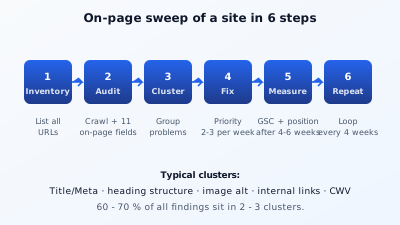
Step 1: Inventory. List of all URLs on your site. Pull it from your sitemap, Search Console, or a crawl of your CMS. Important: the list complete, including location pages, the blog archive and other automatically generated pages. Three columns per entry: URL, page type, estimated importance (High, Medium, Low). Duration: 30 minutes for a small site, two hours for mid-size.
Step 2: Audit. Walk through the list and check the eleven fields per page. Manually with browser inspector and stopwatch, or via a tool that does the job in seconds. Manually takes about ten minutes per page. Automated in an SEO on-page check it's 30 seconds per URL, after which the work moves to interpretation.
Step 3: Cluster. Sort the findings by problem class, not by page. If 18 pages have a missing meta description tag, that's one problem, not 18. Typical clusters: "title duplicate or too generic", "description missing or too short", "H1 multiple or wrong", "images without alt text", "heading hierarchy broken", "mobile issues", "Core Web Vitals red", "internal links missing". 60 to 70 percent of all findings usually sit in two or three clusters.
Step 4: Fix. Work the clusters in priority order. High importance + high cluster share first. Two or three problems per week is enough if you stay consistent. Anyone rewriting all 18 duplicate titles in one session does six good titles per hour. Three hours, done. Whoever drags the cluster across weeks finishes it half done in four weeks and mixes it with three other topics.
Step 5: Measure. Wait four to six weeks and then look in Search Console: did clicks for the changed pages move? Are positions for your main keywords up? Are impressions stable or higher? SEO effects need weeks, not days. Whoever checks the result on day three after a title swap sees nothing and gives up.
Step 6: Repeat. Start the routine from the top, with the new findings from step 5. A 30-page site needs six to eight weeks in the first round, three to four weeks from the second, two weeks from the third routine on. Over time the stock of findings shrinks, the focus shifts to maintenance and small tweaks.
Try it yourself: The free SEO check at yourseo.app/analyse inspects any URL against all eleven on-page fields and surfaces the clusters immediately. Ideal for steps 2 and 3 of the routine, without tool subscription, without install.
The most common mistakes that slow every site
On every other website I look at, the same three mistakes appear. They're no mystery, they're bad default configurations that need fixing one by one each time.
Identical titles and descriptions across dozens of pages. This happens when the CMS theme sets a default title ("Company name | Industry") and nobody enters an individual variant per page. Effect: Google can no longer tell the pages apart, lumps them together, and ranks none of them high. Fix: write your own title per page, your own description per page. Effort for 30 pages: an afternoon. Effect: often double the clicks from the same position.
Images without alt text and huge in size. Theme designers love high-res hero images. Nobody compresses them. A 4 MB JPG loads for seven seconds on a mobile connection. That's a performance killer and a missed SEO opportunity at the same time because the image alt text is missing. Fix: run every image through a compression tool, add alt text, enable lazy loading.
Boilerplate text on location or service pages. "We offer first-class payroll services in Munich, Berlin, Hamburg, Frankfurt and Cologne" with five near-identical location pages is pseudo local SEO. Google recognizes the duplicates, demotes the weakest, and the optimization was for nothing. Fix: every location page gets 600+ words of individual content: local team, local directions, local case work, local specifics.
Three examples from real projects
So the plan doesn't stay abstract, three short findings from actual website optimizations.
Tax law firm, 18 pages. Inventory showed: all 18 pages have "Müller Firm | Tax Advisor Munich" as title. Clearly distinguishable by content, but Google can't tell from the title. We wrote an individual title per page ("Payroll Munich | Müller Firm", "Bookkeeping Munich | Müller Firm", and so on). Three weeks later the service pages had gained one position on average in Search Console, some even two.
Online shop for office supplies, 240 product pages. Audit showed: 198 product pages without their own meta description because the theme had disabled generation. Activation of the automatic description generator with product description as input. Four weeks later: 40 percent more clicks from organic search to the product pages, with no position changes. Classic click-through lever.
Trade business with three location pages. Audit showed: all three location pages ("Berlin", "Potsdam", "Brandenburg") have the same 280-word text with the city swapped. Google barely indexed two of them, one ended up stranded at position 47. We wrote a 700-word text per location with real local references (directions, on-site team member, reference projects in the region). Eight weeks later: all three pages in the top 5 for "[service] [city]".
When on-page alone isn't enough
On-page optimization is the pillar with the fastest lever, but not the only one. If you have all eleven fields clean on 30 pages and still don't rank, you have one of three other problems.
Technical drag. A site with on-page score 95 and a load time of 8 seconds on a phone won't rank. Continue with Core Web Vitals and the technical pillar.
Content too thin. The eleven fields check the form, not the substance. A page with a perfect title and 200 words of text won't beat competition with 1,800 words. The work moves into the content pillar.
Competition too strong. Some terms are so densely contested that a 50-page firm can't beat a 500-page mega-firm, no matter how clean its on-page is. Either long-tail strategy (smaller, more specific terms) or the off-page pillar (backlinks and brand authority) helps here.
In all three cases on-page wasn't wrong, it was the entry ticket. It opens the door but doesn't guarantee ranking by itself.
What you can concretely do after this post
If you have a site and want to start in the next two hours, here's the path:
Hour 1: Inventory the ten most important pages. List with URL, page type, estimated importance. Right after: run a free on-page check per page, ideally with a tool that checks the eleven fields consistently. Note the two biggest issues per page.
Hour 2: Fix the first cluster. Probably titles and meta descriptions, because that's the biggest and fastest lever in 80 percent of cases. Three to five minutes per page to rewrite. After ten pages and two hours you have the first concrete output that shows up in Search Console four to six weeks later.
After that, plan the next four weeks so each week takes one cluster. Week 1 titles and descriptions, week 2 headings, week 3 images and alt text, week 4 internal linking. After a month you have the bulk of the on-page pillar clean, a website that's tangibly competitive, and a routine you repeat every few months.
A free, Google-maintained overview of the basic principles sits in the SEO Starter Guide from Google, which deepens each of the eleven on-page fields with examples. It's an ideal reading companion to this post.
At a glance
SEO-optimizing a website doesn't mean "treat every page the same", it means "set up every page type along its own logic". Four types (home, service, blog, location), eleven on-page fields per page, six steps as a routine (Inventory, Audit, Cluster, Fix, Measure, Repeat). Anyone who runs through this cleanly once in four to six weeks has the on-page pillar checked off and can focus on the other pillars. The most common mistake isn't too little effort, it's too much effort in the wrong cluster, because the big picture is missing. Inventory and cluster before the first edit make this mistake disappear entirely.