"HTTPS, passed." The green tick in the check feels like a formality you check off and forget. In fact, HTTPS is one of the few points where there is no "a little": either your page is served encrypted or it is not. And anyone who does not serve it encrypted gets a "Not secure" warning placed right next to the address in the visitor's browser, loses a small but real ranking advantage, and risks their users' data. The padlock in the address bar is no longer a bonus today, it is the basic equipment of any serious website.
What HTTPS and SSL actually are
HTTP is the protocol your browser and a website's server use to talk to each other. In its original form, plain HTTP, that happens in plain text. Every data packet travelling back and forth is readable by anyone listening along the way: on the open Wi-Fi in a café, at the internet provider, at every node in between. Anyone entering a password on an HTTP page is essentially sending it through the network on a postcard.
HTTPS is the same protocol but with an encryption layer on top, formerly called SSL, today technically TLS. This layer ensures the data travels encrypted between browser and server. Even if someone intercepts the packet, they only see unreadable noise. The certificate required for this also confirms that the server really is who it claims to be, and not a slipped-in impostor.
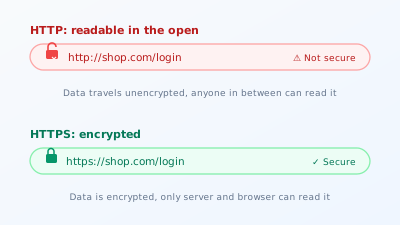
The terms often get muddled. SSL and TLS mean practically the same encryption method, TLS is just the more modern version. An "SSL certificate" today is almost always a TLS certificate, the old name has simply stuck. What matters is not the label but the result: if a closed padlock sits in the address bar, the connection is encrypted.
Why HTTPS is mandatory for SEO
There are three reasons, and none of them is optional.
The first is the direct ranking factor. Google officially declared HTTPS a ranking signal back in 2014 and has confirmed it several times since. The effect alone is small, but it exists, and between two otherwise equal pages the encrypted one wins. In its own documentation on HTTPS, Google describes how it prefers to index and treat encrypted pages.
The second is the browser warning, and that weighs more than the ranking effect. Modern browsers actively mark unencrypted pages as "Not secure," especially once a form field is involved. A visitor who sees that warning before filling in a contact form or buying something will most likely bounce. That is no longer an indirect SEO signal, that is lost revenue in real time.
The third is trust and data protection. Anyone accepting data from users, even just an email address in a newsletter field, has a responsibility to protect that data. Unencrypted transmission of personal data is not just unprofessional, depending on the legal situation it is simply not permitted. HTTPS is the minimum requirement here, not an extra.
Mixed content, the most common stumbling block
Migrating to HTTPS rarely fails on the certificate itself, but on a detail named mixed content. It occurs when an otherwise encrypted page still loads individual elements over unencrypted HTTP.
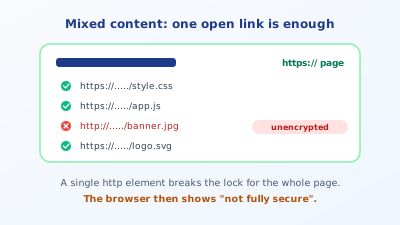
It happens quickly. The page runs under HTTPS, but an image is still hard-linked with http://, an embedded font package comes from an unencrypted source, or an old script is loaded over HTTP. For security this is fatal: a single unencrypted element is enough for the browser to no longer rate the whole page as fully secure. The padlock disappears or gets a warning triangle, and some browsers simply block the insecure element, so parts of the page appear broken.
Mixed content is tricky because the page works on the surface. The owner sees a closed padlock on the homepage and thinks all is well, while a subpage with an old embedded image quietly loses the lock. So after every HTTPS migration, a systematic run through all page types belongs to the job, not just a glance at the homepage.
The fastest way to track down mixed content is the browser's developer console. Open it with the F12 key and reload the suspect page: every element loaded unencrypted is listed there as a warning with the note "mixed content," including the exact URL. So you not only know a problem exists, but exactly which file triggers it and where to start.
Try it yourself: The free SEO check at yourseo.app/analyse checks whether your page is served cleanly over HTTPS, alongside ten other on-page fields. In under 30 seconds you see whether the encryption really takes hold.
Setting up HTTPS correctly
The migration is much easier today than years ago, because certificates are available for free and automated. Five steps lead to a clean result.
Get a certificate. Through providers like Let's Encrypt, there are free certificates that renew automatically. Most hosts offer this with a single click in the customer menu. An expensive certificate is not needed for a normal website, the encryption is equally strong across all of them.
Redirect everything from HTTP to HTTPS. Every request to the old unencrypted address must be sent via a permanent redirect to the HTTPS version. That way visitors and search engines always land on the secure variant, and the old address loses its relevance instead of continuing to exist in parallel.
Eliminate mixed content. Switch all hard-linked http:// resources in the source code, the database, and embedded templates to https://. On a CMS, a search-and-replace across the database often helps, correcting all old links at once.
Adjust canonical and internal links. Each page's canonical should point to the HTTPS version, and internal links should reference HTTPS too. This is exactly where HTTPS connects to the topic of duplicate content: if http and https are reachable in parallel, duplicates arise, which the post on canonical tags and duplicate content covers in detail.
Update Search Console and the sitemap. Add the HTTPS variant as its own property in Search Console and resubmit the sitemap with the HTTPS URLs, so Google adopts the secure version quickly.
Optional but recommended is HSTS, a server setting that tells the browser: "This page only exists encrypted now, do not even ask over HTTP." That closes one last gap and slightly speeds up future visits.
HTTPS is a speed question too
A widespread myth says encryption makes the page slower. That was minimally true many years ago, but today it is the opposite. The reason is HTTP/2, the more modern version of the transfer protocol, which loads noticeably faster than the old one. The crucial part: HTTP/2 in practice only works over HTTPS. So anyone not using encryption automatically locks themselves out of the faster transfer and stays stuck on the old, slower protocol.
Concretely that means: an HTTPS page with HTTP/2 can load many resources simultaneously over a single connection, instead of working through them one after another as before. Especially on pages with many small files, so most modern websites, that is a genuine speed gain. HTTPS is therefore not just a security but also a performance decision, and both feed into rankings. How strongly load time influences rankings is explored in the post on load time and Core Web Vitals. The often-heard objection that the certificate costs processing time barely matters on modern hardware and is more than offset by the speed gain from HTTP/2.
Common mistakes during migration
Four patterns show up especially often.
The first is the missing redirect. The certificate is installed, the page runs under HTTPS, but the old HTTP version stays reachable in parallel because nobody set up the redirect. Now every page exists twice, and Google has to guess which one counts. This is the classic case that turns a security improvement into a duplicate content problem.
The second is overlooked mixed content. The homepage shows green, but product pages or old blog posts still load images over HTTP. Without a systematic check, this often goes unnoticed for months, until a user wonders about the missing padlock.
The third is the expired certificate. Older certificates have to be renewed regularly. If one expires without the automatic renewal kicking in, the browser suddenly shows a full-page warning that reliably drives visitors away. Setting up the automatic renewal once and testing it once prevents this scare.
The fourth is hard-coded HTTP links. In content created over years, there are often hard-entered http:// links to your own site. They do reach the target thanks to redirects, but create unnecessary intermediate steps. Before publishing, it is worth looking at the whole picture through a full on-page check, which assesses HTTPS alongside the other technical fields.
What HTTPS does not do
One important misunderstanding to close with, so the padlock is not overrated. HTTPS encrypts the transport path between browser and server. It says nothing about whether the page itself is trustworthy. Even a fraudulent phishing page can have a valid certificate and show the green padlock. So the lock means "the connection to this server is tap-proof," not "this provider can be trusted." This distinction matters, because many users wrongly read the padlock as a seal of authenticity.
For you as the operator, this means HTTPS is the necessary foundation but no substitute for the other trust signals like a complete imprint, a reachable address, and reputable content. It is the entry ticket, not the whole concert. And it only protects the transmission path, not, say, a poorly secured database or an outdated CMS behind it. Security is a chain of many links, HTTPS is one of them, the most important visible one, but just one.
Quick FAQ
Do I need HTTPS if I have no forms? Yes. Even a pure information page benefits from the ranking factor and avoids the "Not secure" warning in the browser. HTTPS is the standard today, not the exception.
Does an SSL certificate cost money? Not necessarily. Through providers like Let's Encrypt, certificates are free and renew automatically. Most hosts integrate this directly. Expensive certificates offer no added value in encryption for normal sites.
Does HTTPS directly improve my ranking? As a single factor only slightly. The bigger effect comes indirectly through trust, fewer bounces, and avoiding the browser warning. On balance it is clearly positive.
Do I lose rankings during migration? With a clean migration using permanent redirects, hardly any in the short term. What matters is that every old URL points correctly to the HTTPS version. If the redirect is missing, temporary fluctuations can occur.
What is HSTS and do I need it? HSTS is a server setting that forces browsers to call the page exclusively over HTTPS. It is not mandatory, but it closes one last security gap and is set up with little effort.
Does HTTPS make my site slower? No, the opposite. Only over HTTPS is the faster HTTP/2 protocol available, which loads many resources in parallel over one connection. The minimal overhead of encryption is more than offset by the speed gain.
At a glance
HTTPS encrypts the connection between browser and server and is no longer a bonus today but basic equipment. It is a ranking factor, but above all a trust signal whose absence the browser punishes with a "Not secure" warning. The most common stumbling block is mixed content, where a single unencrypted element breaks the padlock for the whole page. Set up a free certificate, redirect consistently from HTTP to HTTPS, eliminate mixed content, and update canonical, sitemap, and internal links, and you have done the migration cleanly. After that, a verifying look across all page types belongs to the job, not just the homepage. Encryption is one of the basic prerequisites for building visibility on Google at all.