The finding in the check sounds harmless: "No canonical link set. Duplicate URLs (with/without slash, with/without www) can cause duplicate content." Many wave it off, because they only know one version of their page. That is exactly the misunderstanding. To you, it is one page. To Google, it can be four, five, or ten different URLs all showing the same content. And if Google does not know which one is the real one, it splits your ranking power across all of them instead of pooling it on one. The canonical tag is the small line in the source code that settles this dispute.
What a canonical tag does
A canonical tag is a single line in the <head> of your page. It looks like this:
<link rel="canonical" href="https://your-site.com/product" />
This line tells Google: "If you find this content under several addresses, this one is the authoritative version. Rate it, index it, and treat all others as copies of it." The word canonical comes from Latin and roughly means "authoritative" or "serving as a rule." That is exactly the job: to name, out of several possible URLs, the one that counts.
What matters is what the tag is not. It is not a redirect and not a block. A visitor who opens a copy still sees that copy, and the Googlebot can still fetch it. The canonical works purely at the indexing level, as a hint about which address Google should take into the index and rate when several with the same content are on offer.
Google follows this hint in the vast majority of cases, but treats it as a strong recommendation, not a command. With clear signals, it is almost always respected.
How one page accidentally becomes four
Most site owners think in one URL per page. Servers and CMSes think differently. The same product page is often technically reachable under several addresses without anyone setting that up on purpose.
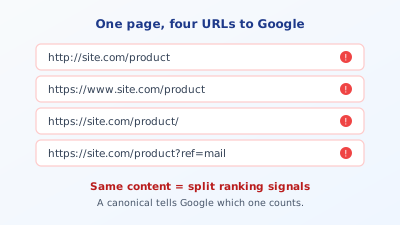
The usual suspects: your site runs under http:// and https:// at once, because the old unencrypted version was never cleanly redirected. It is reachable with www. and without. It works with a trailing slash and without. Then come addresses with parameters: a newsletter link adds ?ref=mail, a campaign ?utm_source=..., a filter in the shop ?sort=price. Each of these variants is, to Google, a separate URL with its own content at first, and if the content is identical, Google suddenly has four copies of the same page in front of it.
The tricky part: you do not notice it day to day. In the browser you type an address, get a page, everything looks clean. Only when you check Search Console or run an on-page check do you notice that the same page sits in the index several times, or that a variant ranks that you never promoted.
Why duplicate content costs rankings
Duplicate content rarely leads to a direct penalty. Google does not punish duplicates the way it punishes copied third-party content. The real problem is more subtle and costs positions anyway.
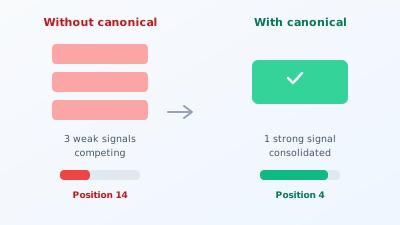
The first damage is the spread of signals. When other sites link to your product page, some to the www version, some to the one without, the link power spreads across two URLs instead of gathering on one. One strong signal becomes two half ones. In a competitive field, exactly that decides between page one and page two.
The second damage is selection by Google. If you do not say which URL is the right one, Google decides for you. Sometimes it picks the version with the ugly tracking parameter, sometimes the unencrypted http variant, sometimes an outdated address. You lose control over which URL appears in the search results, and you can craft the prettiest snippet only for it to apply to a URL nobody sees.
The third damage is crawl budget. Google does not crawl your domain endlessly. If the bot spends its time walking five identical variants of the same page, less time remains for the pages that are genuinely new or important. On small sites that does not matter, but on large shops with thousands of products and countless filter URLs it becomes a real bottleneck. In its own guide to consolidating duplicate URLs, Google describes how a clear canonical helps exactly here, steering the crawl toward what matters.
A real example makes the effect tangible. A fashion shop had a product page for a well-selling dress that was reachable through the filter navigation under dozens of URLs: once from the "summer dresses" category, once from "sale," once with a sort parameter, once with a colour filter. Google had 28 variants of the same product page in the index, each with a fraction of the signals. In the search results, of all things the variant with ?sort=price-desc in the URL appeared, the ugliest address. After setting a self-referencing canonical to the clean product URL, the 28 variants collapsed to one within three weeks, and the position for the main keyword rose from page two to spot five. Not a word of content was changed, only the signals pooled.
Try it yourself: The free SEO check at yourseo.app/analyse checks in under 30 seconds whether your page sets a canonical and whether it points to a reachable, sensible URL. So you see at once whether there is a hole here.
How to find your duplicates
Before you set anything, it is worth looking at which variants Google even knows. Three routes get you there quickly. In Search Console, the indexing report under "Pages" shows the "Duplicate" category, often with the note that Google itself chose a different URL as canonical. That is the clearest warning that your own choice is missing or being ignored. The second route is a simple search for site:your-site.com directly on Google: if several near-identical results with slightly different URLs show up, you have duplicates in the index. The third route is the URL inspection in Search Console for a specific address, which shows you Google's chosen canonical URL directly.
This inventory prevents the most common mistake: setting canonicals blindly without knowing which variants even exist. Only once you know the picture do you decide sensibly which URL should be the authoritative one.
Setting the canonical correctly
The good news: in most cases the solution is simple. Four rules cover almost everything.
Every page points to itself. The most common and most important case is the self-referencing canonical. Your product page carries a canonical pointing to exactly this product page, in its preferred spelling. That sounds redundant, but it is the strongest signal of all: it makes clear that this clean URL is the authoritative one, and it automatically catches all the parameter variants someone might otherwise call up.
Always the full, absolute URL. The canonical belongs written out with protocol and domain, so https://your-site.com/product, not just /product. Relative paths are often interpreted correctly, but they are an avoidable source of error.
Only one canonical per page. Several canonical tags on one page cancel each other out, and Google then usually ignores all of them. On CMS systems this happens quickly when the theme sets one and an SEO plugin adds a second. Exactly one must remain.
Pick one variant and follow it consistently. Decide on with or without www, with or without a trailing slash, and redirect all other variants via a server redirect to the chosen one. The canonical and the redirect then work together: the redirect sends visitors and bots to the right URL, the canonical confirms it as authoritative.
On a CMS like WordPress, a good SEO plugin handles the self-referencing canonical automatically for every page. You then only need to step in for special cases, for example when a category page should point to another.
A case of its own is filter and pagination pages in shops and large blogs. Here it depends on what the variant is meant to do. A filtered view like "red shoes in size 42" offers no standalone value for search and should point its canonical to the parent category or carry a noindex outright. Pages two, three, and four of a blog listing, by contrast, are genuine separate pages with different posts, and each should get a self-referencing canonical, not all point to page one. The common reflex of bending all pagination pages to the first page via canonical only makes Google find the posts on later pages worse. The rule of thumb: if the variant has its own unique content, it points to itself. If it is just another view of the same content, it points to the original.
The most common canonical mistakes
A wrongly set canonical is more dangerous than none at all, because it actively sends Google in the wrong direction. Four mistakes show up especially often.
The first is the canonical to the wrong page. After a relaunch or theme change, suddenly every page points its canonical to the homepage, because a template was hard-wired. The result: Google drops all subpages from the index, because it believes they are only copies of the homepage. Such cases show up in Search Console as hundreds of pages suddenly appearing as "Duplicate, Google chose a different page as canonical."
The second is the combination of canonical and noindex on the same page. These are contradictory instructions: the canonical says "this page is the authoritative one," noindex says "do not take this page into the index." Google has to guess, and the result is unpredictable.
The third is the canonical to a redirected or unreachable URL. If the canonical points to an address that returns a 404 or itself redirects, the signal is worthless. The canonical must always point to a directly reachable page with status 200.
The fourth concerns pages with the same or similar content that should nevertheless rank independently. With near-identical location pages or template pages, a canonical is not enough to tell them apart. Here real, original content helps more than any technical instruction. How much text that takes is covered in the post on how many words a page needs, and why duplicate titles and descriptions have the same effect is in the post on title and meta description.
Quick FAQ
Does Google penalise duplicate content? As a rule, not directly. Google does not punish, it selects and distributes signals. The damage comes from split link power and wrong URL selection, not from a penalty.
Do I need a canonical if my page only runs under one URL? Yes. Even a single attached tracking parameter creates a second URL for Google. The self-referencing canonical catches that before it becomes a problem.
Is the canonical the same as a 301 redirect? No. A 301 physically sends visitors and bots to a different URL. The canonical leaves the page reachable and only gives search engines a hint about which version to rate. Often you use both together.
Can I point a canonical to an external domain? Technically yes, used for syndication, when your article appears on a partner portal and the canonical points to the original. Within one domain, though, the canonical should always point to your own URL.
Canonical or noindex for filter URLs, which is right? Both have their place. If the filtered view should not be in the index at all, noindex is clearer. If it should stay reachable but pass its signals to the main page, the canonical is the right lever. Both at once on the same page, by contrast, is a contradiction you should avoid.
How fast does a corrected canonical take effect? Google has to recrawl and reassess the page, which usually takes a few days to a few weeks. For important pages, a manual indexing request in Search Console can speed it up. On very large sites with a slow crawl, it can take longer until Google has reclassified all variants.
At a glance
To you it is one page, to Google often several URLs with identical content. Without a canonical, link power and ranking signals spread across these variants, Google picks which URL appears, and the crawl budget drains into duplicates. The self-referencing canonical with a full absolute URL, exactly one per page, together with clean redirects, solves this in most cases. A wrongly set canonical, however, does more harm than a missing one, so every change deserves a verifying look in Search Console. Cleanly pooled signals are one of the foundations of your domain's visibility on Google.