It sounds like an ad promise but it's plainly true: a big share of SEO optimization costs nothing beyond time. Most levers on your own website are direct copy, tags and configuration changes you make yourself, without buying a tool. Push that to the limit and a 30-page SMB site goes remarkably far without spending a cent on software. This post lists the 14 methods that work in practice, sorts them by impact, and shows honestly where "free" hits its ceiling.
Why so much works for free
SEO tools sell three things: data, automation and convenience. Data like search volume, backlink profiles or competitor rankings is genuinely expensive because it sits on top of huge crawler infrastructure. Automation saves time. Convenience is the polished surface that ties the first two together.
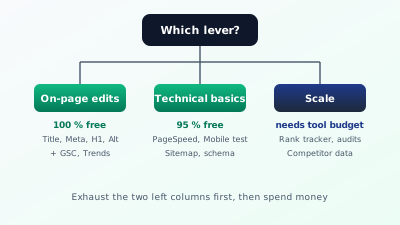
What a tool doesn't replace: the editing work on your own site. Title and meta description are written by a person in the end. H1 and heading structure are changed by a person. Alt text, internal links, cleaning up a sitemap, tending the Google Business Profile, writing better content. All manual steps. A tool tells you where it's stuck. You solve it. That's exactly where the free share of SEO optimization lives.
The sober truth: on a normal 30-page site, around 70 to 80 percent of all effective measures in the first three months are possible for free. A tool budget only really pays off past a certain maturity (continuous monitoring, competitor tracking, scaling across many pages). Anyone still curious what a German SEO tool might look like in the paid stage can browse the feature set on the home page. A solid pillar post on SEO optimization maps the five areas the following 14 methods live in.
The 14 free methods at a glance
Sorted by effort and impact. Working in the listed order pulls the most out of the free segment.
1. Connect Google Search Console. This is the most important free step at all, and the first one missing on many small sites. Search Console shows you which queries surface your site on Google, how often it gets clicked, at which position, which pages are indexed, which issues Google sees. Connection takes 15 minutes and gives you data no paid tool can reproduce exactly. Google delivers the truth about your own visibility for free here.
2. Bing Webmaster Tools alongside. Similar to Search Console, but for Bing. Worth it because ChatGPT search and Copilot answers partly rely on Bing's index. Effort: ten minutes, same code-snippet mechanism as with Google. Result: double visibility on two of the largest indices in the world.
3. Google PageSpeed Insights for top pages. Free tool that returns Core Web Vitals per URL with concrete suggestions. Ten to 15 minutes per page. You learn whether you're too slow, why, and which images or scripts are the biggest brakes. Some fixes cost nothing (shrinking images, deactivating old plugins), others are code work for you or your developer.
4. Google Trends as a research substitute. Without absolute volume numbers, but with comparative patterns: which keyword is rising, which is falling, which is seasonal? If you do keyword research without a paid tool, combine Trends with Google search suggestions ("People also ask", "Related searches", autosuggest). That doesn't replace a pro tool, but covers 70 percent of the research you need.
5. Rewrite title and meta description. Three minutes per page, pure edit work. Watch click-through in Search Console before and after the swap. Going through all 30 pages takes 90 minutes and often shows 20 to 40 percent more clicks at unchanged positions within four weeks. No tool needed, just a clear head and an understanding of what the searcher expects.
6. Check H1 and heading structure. Visible in the browser via right-click "Inspect". Two minutes per page. Watch for: exactly one H1, sensible H2-H4 hierarchy, no jumps, no empty headings. CMS themes often have this systematically wrong, fixable centrally in the theme config.
7. Add alt text to every image. In WordPress, Webflow, Shopify or any modern CMS, the field sits right next to the image. 30 seconds per image, an honest description of what's visible. Systematically going through a site with 200 images takes two hours. Effect: accessibility plus an indirect SEO signal plus better image search.
8. Clean up internal linking. Two to five links per page to thematically related pages. Five minutes per page. Setting all internal links systematically across 30 pages gives your site a structure Google understands much better. Completely free because you decide what links where.
9. Check robots.txt and XML sitemap. Both files sit in the root of your site and are visible in the browser: your-domain.com/robots.txt and your-domain.com/sitemap.xml. Wrong Disallow rules often accidentally block indexable content. Sitemaps are often stale or never submitted. Both can be checked in 20 minutes, submitted in Search Console, done.
10. Add structured data. Schema.org as JSON-LD in your page's <head>. For the main page types (home = Organization or LocalBusiness, blog posts = Article, product pages = Product, FAQ = FAPage), generators and templates exist that you carry over to your own CMS for free. A two-to-four-hour one-time investment with lasting effect on rich snippets.
11. Fill out the Google Business Profile completely. For anyone with a location or regional service. Categories, description, hours, photos, regular posts, answer every review. Effort: two hours once, then 15 minutes per week. Map Pack effect often greater than three new blog posts per month. More in the Local SEO 2026 post.
12. Actively collect reviews. By email after the appointment, by QR code at reception, with a direct link to the review page. Completely free, but takes consistency. A practice with 30 new reviews per quarter overtakes one with 200 old reviews from three years ago in local ranking.
Try it yourself: The free SEO check at yourseo.app/analyse inspects any URL without signup. You get a list of on-page issues you can fix yourself in the next hour, no extra tool, no account.
13. Expand content depth. One to three hours of writing per page. Take an existing page, look at the first ten organic results for your main keyword, find sections or questions you don't answer yet, fill them in. No 300-word pages against 2,000-word competition. Reworking five of your worst pages per month shows clear movement within six months.
14. Honest date upkeep. Dated content often gets promoted in search results when Google recognizes it as current. Going through your top posts every few months, adding small updates and showing the update date signals freshness without trickery. Important: real updates, no blind date polishing without content changes.
What gets what done? The effort-impact matrix
Not every one of the 14 methods is equally important. The matrix below shows where the quick wins sit, what's project work, what's filler, and where time leaks away.
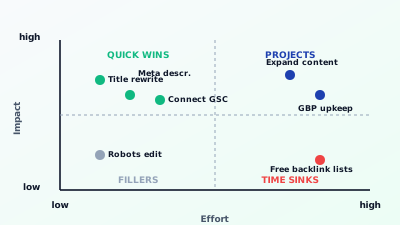
The upper half holds the genuinely effective measures. Title and meta rewrites, connecting Search Console, writing better content. The lower half holds the fillers that feel good but move little. Robots.txt fine-tuning belongs here, as long as nothing is seriously broken. And in the bottom-right corner, the worst: collecting free backlink lists from dubious sources to enter into 50 directories. Big effort, zero to negative impact.
Practical heuristic: anyone at the start of the SEO journey should spend 70 percent of their time on title/meta rewrites and content improvement. 20 percent on technical basics (Search Console, PageSpeed, sitemap, schema). 10 percent on local (if relevant). Everything else is decoration for now.
Where "free" honestly stops
Three points hit the ceiling of the free model. Worth spotting them early so you don't grind against the limit for years.
Scaling. Anyone with 200 products or 500 blog posts can't manually check every page every week. This is where crawlers enter, walking through your whole domain. Open-source tools like Screaming Frog (free version up to 500 URLs) help a lot, beyond that you need either the paid version or a browser-based alternative.
Competitor data. Which keywords are your competitors ranking for that you aren't? Which backlinks do they have that you lack? Which of their pages are growing, which are falling? Such data comes from large crawler indices that aren't freely accessible. Anyone seriously wanting to answer this question needs a paid tool.
Continuous rank tracking. Sure, you can manually google your main keyword once a week. Doable for 5 keywords, not for 30. Free entry-level tools help here (for example a free rank tracker for three keywords) that pull positions automatically for your most important terms. Anyone seriously tracking 50 or more keywords needs budget.
Watch out: three "free" tricks that hurt
Search the web for "free SEO" and forums and older guides will recommend three things that today cause damage instead of helping.
Free backlink exchange lists. The idea: you enter yourself into 50 directories and get 50 backlinks. Worked in the 2000s. Today Google recognizes such profiles instantly and devalues them. Worst case, you get an algorithmic penalty that's hard to shake. Save the time.
Mass-generated AI babble. Tools exist that produce "1,000 words of SEO copy in 30 seconds". Google recognizes the patterns, demotes the pages, and you've cluttered your domain with thin content. A well-researched human text of 800 words beats ten AI texts of 2,000 words. If you use AI, use it for outlines, not as the final product.
Keyword stuffing in footer or hidden divs. "Hidden keywords" as an optimization trick belong in the past. Google has reliably caught this for over a decade. Sites that get flagged drop out of the index. When in doubt: hide nothing, repeat nothing nine times in near-invisible gray-on-gray at the bottom.
A realistic four-week plan without a tool budget
Anyone who actually starts with the 14 methods above gets a surprising amount done in a month. A proposal:
Week 1. Connect Search Console and Bing Webmaster. Measure PageSpeed for the three most important pages. Build a list of the 20 most important pages.
Week 2. For each of the 20 pages, rewrite title and meta description. Check H1 and heading structure. Add alt text for the most important images.
Week 3. Walk through internal linking systematically. Check robots.txt and sitemap and submit them in Search Console. Add structured data for the home page and one other page type.
Week 4. Complete the Google Business Profile (if you have a location). Start the first review push. Rework one of the content-weakest pages and grow it to 1,000+ words.
After these four weeks you've invested 40 to 60 hours. You haven't spent a cent on tools. And you have a site miles above the German SMB average. Effects show up in Search Console after two to three months, in tangible traffic growth after four to six months.
An official starting point for the fundamentals is the SEO Starter Guide from Google, which deepens every lever named here with examples and gets updated regularly. It's also valuable because there's no tool sale behind it and it comes straight from the source.
When does the jump to paid tools pay off?
Three indicators tell you you've extracted the maximum from the free territory:
- You have every on-page field clean on your 30 most important pages, technical basis stands, Search Console is green. But positions for your top keywords stagnate between 6 and 12.
- You've lost overview of what your competitors are doing. You only see your own movement, not the market.
- You spend more than two hours per week manually pulling data a tool would surface in ten minutes.
If at least one applies, the jump pays off. Until then, "free SEO optimization" isn't a fallback, it's the most efficient stage of your work. Anyone skipping it and immediately booking a 99-euro subscription is buying data on problems they haven't started to solve yet.
At a glance
SEO optimization costs nothing beyond time for 70 to 80 percent of the work when you start. Search Console, Bing Webmaster, PageSpeed, Google Trends, title and meta rewrites, H1 and heading hierarchy, alt text, internal links, robots.txt and sitemap, structured data, Google Business Profile, reviews, content depth and honest date upkeep are 14 levers without a tool budget. The boundary only appears at scaling, competitor tracking and continuous rank monitoring. Walking these 14 methods consistently in four weeks builds a base on which any later tool delivers noticeably more impact.