A line in the SEO check turns red: "Word count, 91 words, critical." The first reaction is almost always the same. "But the page is finished, everything important is on it." That is exactly the trap. A page can feel finished and still be so thin in Google's eyes that it has almost no chance of a top position. The word count is only the symptom. The real problem is called thin content, and it becomes fixable the moment you understand what Google is actually measuring with that number.
What the word-count check really counts
Start with the technical side, because this is where most of the confusion begins. A good on-page check does not count the characters in the HTML, the text in the navigation, the footer, or the cookie banner. It counts the visible words in the main content of the page, meaning what a reader perceives as the actual text. At 91 words, that means the substance of the page fits into one short paragraph.
This distinction matters. A page can look large in the source code because the menu, sidebar, footer, and scripts fill hundreds of lines. None of that counts toward the assessment. Google cares about the part that answers the user's query. If that part is three sentences long, the page is thin, no matter how elaborate the surrounding shell is.
The term thin content comes straight from Google. It describes pages with "little or no added value" for the user. A product page that only copies the manufacturer's blurb. A guide page that asks a question but never answers it. A landing page with a headline and a button, but nothing in between. All of it falls under the same finding, and the word count is the simplest way to make it measurable.
Why thin content collapses in the rankings
The logic is not "more text equals better." It is more subtle. Google wants to answer the user's query as completely as possible. Someone searching "change tax class" carries a whole set of unspoken follow-up questions: How do I do it? What deadlines apply? What does it cost? Which documents do I need? A page with 91 words might answer one of them. A page with 1,200 words answers all four, and that is precisely why it keeps the user on the page instead of sending them back to the search results.
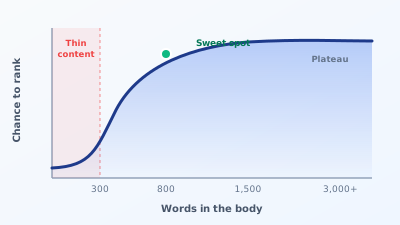
That bounce-back rate is the actual signal. When a user clicks your result, jumps back after four seconds, and clicks the next result, Google has learned one thing: this page did not answer the question. Thin content produces exactly that behaviour, because it leaves the user stranded after the first paragraph. Repeat that across many visitors, and the position slips.
There is a second effect that many underestimate. A page with three sentences can only be relevant for a single, very narrow keyword. A thorough page automatically covers many related search terms without you deliberately adding them. This is called keyword coverage across the long tail, and it is the reason longer pages rank for hundreds of different queries in practice, while the thin page shows up for one query if you are lucky.
Google has codified this in its own guidelines over the past few years. In the guidance on helpful, reliable content, the question to ask of every page is roughly this: would a visitor feel they learned enough to reach their goal? At 91 words, the honest answer is almost always no.
Why the number still is not the goal
Now comes the part most guides get wrong. They turn "300 words minimum" into a law and "more is better" into a religion. Both are nonsense, and both do damage.
There is no magic word count above which a page ranks. 300 words is a rough floor below which pages rarely perform well, not a threshold that guarantees anything. A page with 305 words full of filler is worse than one with 280 words that answers a question precisely. The number is a hint, not a verdict.
The opposite reflex is just as wrong. A page with 3,000 words that inflates 800 words of substance to triple the length does not rank better, it often ranks worse. The user scrolls through filler, never finds the answer, and bounces. Google sees the same fast bounce as with the too-short page. Bloated content is thin content in disguise.
The right yardstick is not the word count but complete coverage of search intent. The question is: does this page answer everything someone with this query wants to know, and not one word more? Sometimes that is 400 words, sometimes 2,500. The word count is just the trail that reveals whether you probably said too little.
Try it yourself: The free SEO check at yourseo.app/analyse counts the words in your page's main content and tells you in under 30 seconds whether it sits above the critical threshold, alongside ten other on-page fields.
How much text your page type really needs
Instead of a single number, it helps to think by page type. Different pages have different jobs, and that determines how much text makes sense.
| Page type | Realistic range | What matters |
|---|---|---|
| Blog guide, how-to | 1,200 to 2,500 words | answer the question fully, cover follow-ups |
| Guide for a competitive keyword | 2,000+ words | at least as deep as the pages ranking now |
| Service or offering page | 600 to 1,200 words | benefit, process, trust, differentiation |
| Product page | 300 to 800 words | own text instead of manufacturer copy, use, FAQ |
| Local location page | 500 to 900 words | place, service, directions, local references |
| Homepage | 400 to 800 words | clarity on what, for whom, why here |
These figures are corridors, not targets. The most reliable compass is the competition. Look at what ranks on page one for your keyword and roughly count the words of the top results. If the top five all sit between 1,800 and 2,400 words and your page has 400, you know where the gap is. For this query, Google has clearly decided that depth is required.
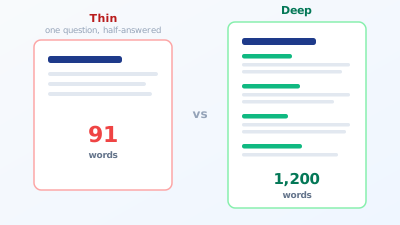
A concrete example from practice. A tax advisor had a separate page for each area of service, each around 120 words: a headline, one sentence of explanation, a contact button. Every page was technically clean, title and meta description set. None ranked. The competition had pages of 1,000 to 1,500 words on the same topics, explaining process, costs, deadlines, and common mistakes. After expanding to comparable depth, three of the pages climbed to page one within two months. It was not a technical problem, it was a content problem.
There is a simple method to know how deep a page needs to be before you write it. Spend five minutes in the searcher's shoes and write down every question they have around their topic. For "change tax class" that would be: Where do I file the request? What deadline applies? Do I need my partner's consent? What changes in my net pay? Can I reverse it? Each of those is its own paragraph. Six honest questions almost automatically produce 1,000 to 1,500 words without you stretching a single word. The word count emerges as a by-product of completeness, and that is exactly how it should be. Start with the question list instead of a word target, and you never write too short or too bloated.
How to spot and fix thin content
Thin content rarely appears alone. If one page is thin, there are usually several. So the first step is a domain-wide inventory, not a look at a single page. That is exactly what a full on-page check delivers, listing every page below a word-count threshold instead of leaving you to guess.
Once you know the thin pages, there are four routes, and only one of them is "write more":
Expand. The page covers the right topic but says too little. Here you add the missing intent blocks: the follow-up questions, the how, the costs, an example, a short FAQ section. The key is that every new paragraph answers a real question rather than feeding the word counter.
Consolidate. You have five thin pages on the same topic competing with each other. Instead of bloating each one, merge them into one strong page and set up redirects. Five times 200 words becomes one time 1,400 words, and suddenly there is one page that can rank instead of five that cannibalise each other.
Remove from the index. Some thin pages are not meant to rank at all. A thank-you page after a form, an internal archive, a pure function page. Such pages get a noindex and disappear from the assessment instead of dragging down the domain's overall impression. A domain full of thin pages looks weaker to Google as a whole, even if some good pages are mixed in.
Delete. If a page brings neither traffic nor covers a topic you need, deleting with a redirect is often the cleanest solution. Fewer but better pages almost always beat many weak ones.
Which route is right is revealed by a look at your Search Console data. A page that collects impressions but few clicks because it sits at position 14 is a clear expansion candidate. A page with no impressions for months is more of a delete or consolidate case.
The most common mistakes when fixing it
When people hear the word count is too low, they often do exactly the wrong thing. Three patterns show up again and again.
The first is keyword stuffing in disguise. Instead of adding real content, the same search term is repeated in twenty variations until the word count fits. Google has detected this reliably for years, and it does more harm than the originally short page. Word count without substance is not progress.
The second is copied boilerplate. A location page is brought to 800 words by putting the same text block on every city page, only swapping the place name. That solves the word-count problem and creates a new one: duplicate content across many pages. Anyone who wants to avoid this in detail should look beyond length at title and meta description as well, because on such template pages those are just as often identical.
The third is AI inflation. A short text is stretched to triple the length by a language model, full of transition sentences and platitudes. The result hits the word count and still says nothing. Google aimed its policies on scaled content abuse at exactly this. It is never about volume, it is about the value per word.
Quick FAQ
Is there a minimum word count above which Google ranks? No. 300 words is a rough floor below which good placements are rare, not a threshold above which something happens. What matters is full coverage of the query, not hitting a number.
Can a page be too long? Yes, if the length is filler. A page that gives its answer in 600 words and gets stretched to 2,000 ranks worse, not better. Being long is allowed, being bloated is not.
Does footer or sidebar text count? Not for a good check. What gets measured is the main content, the part that answers the query. Navigation and footer text stays out.
My shop has 800 product pages with short text. Do all of them need 800 words? No. Product pages can be shorter if the text is original and covers use and common questions. It only becomes critical when every page copies the same manufacturer blurb. Then length is not the problem, uniqueness is.
How fast does an expansion take effect? Usually over weeks, not days. Google has to recrawl the page, reassess it, and register the changed user behaviour. Two to eight weeks is a realistic range, depending on how often your page is crawled.
At a glance
The word count is an early warning, not a goal. 91 words almost always means a page does not fully answer the query, and that is exactly what costs rankings. The fix is never "somehow reach 300," but to serve the search intent completely: answer every real follow-up question, no word of filler, and consolidate or delete thin pages rather than stretching them artificially. Do that, and you solve not the check but the problem behind it. And the more of these problems you solve, the more your visibility on Google grows.