In the check, "image alt text" often shows a green "passed, 1 of 1." That sounds like the all-clear, but it is only half the truth. The check counts whether an alt text exists, not whether it is any good. An alt text reading IMG_4821.jpg technically counts as set and passes the test, yet says nothing at all to Google or to a blind user. On many pages, images are the largest files and at the same time the most neglected SEO area. Set them up right and you gain traffic from image search, a faster page, and an accessible website. Ignore them and you leave all of that lying there.
What the alt text is and what it does
The alt text, short for alternative text, is a description of the image content in the HTML code. It sits in the image's alt attribute and is normally invisible. It becomes visible exactly when the image cannot load, for instance on a slow connection. Then the browser shows the alt text instead of the image. But that is only its most obvious function. Two others matter more.
First, accessibility. People who are blind or have severe visual impairments use a screen reader that reads the screen content aloud. For an image, the program reads out the alt text. If it is missing, the screen reader says "graphic" at best and the cryptic file name at worst. So the alt text is the only way a blind user learns what an image shows. The W3C even provides a decision tree for alt text showing which description fits when.
Second, understanding by Google. A search engine cannot see a photo the way a human can. It relies on text signals to understand what an image shows, and the alt text is the strongest of them. It largely decides whether your image appears in Google image search for the right queries. In some industries, such as recipes, fashion, or trades, image search is a serious traffic source that stays completely unused without alt texts.
What makes a good alt text
A good alt text describes the image so that someone who cannot see it can picture it. Concrete, brief, truthful.
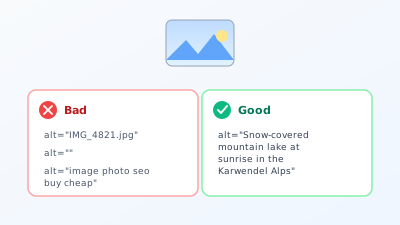
Bad is anything that does not describe: the file name IMG_4821.jpg, an empty attribute on a content-relevant image, or a string of keywords like "image photo seo buy cheap." The last is even dangerous, because Google recognises keyword stuffing in the alt text as an attempt at manipulation, and it can hurt rather than help.
Good is a natural description of what is actually visible. So instead of IMG_4821.jpg, "Snow-covered mountain lake at sunrise in the Karwendel Alps." This description helps the blind user, helps Google match the image to the right query, and incidentally contains relevant terms without forcing them in. If the page's main keyword fits naturally into the description, it belongs there. If not, it is not forced.
On length: an alt text is a sentence, not a paragraph. A brief, precise description in roughly five to fifteen words usually hits it. What goes beyond the image, such as the story behind it, belongs in the visible caption, not in the alt text.
Alt texts for different image types
What counts as a good alt text depends on what the image is meant to do. A few concrete cases make this tangible.
Product image. Describe the product the way a customer would search for it, including the key features. Instead of "shoe," rather "Red leather sneaker with white sole, side view." On a shop with variants, it pays to name colour and model so the right image is found for the right variant.
Photo of people. Name who is shown and what the person is doing, if that matters for the context. "Dentist Dr. Meier advising a patient" is stronger on a practice page than "woman in a coat." On a team photo, the name may be added, because people also search by name.
Infographic or chart. Here "chart" never suffices. Summarise the key message: "Bar chart showing the rise in load-time abandonment from three seconds onward." Anyone who wants to make the full information accessible adds it in the body text as well, because an alt text never fully replaces a complex graphic.
Logo. A logo's alt attribute simply contains the company name, often with the addition "logo." Nothing more is needed, because the logo carries no further image information.
Decorative image. A purely atmospheric image with no informational value gets an empty alt text, more on that later. The question that decides everything: would a blind user miss anything if this image were gone? If no, the empty alt text is right.
A good self-check is the phone test. Imagine describing to someone on the phone what is in the image, so they can picture it. That exact sentence is your alt text. No more, no less.
A real example shows the effect. A small online shop for handmade ceramics had over 300 product images, all with the automatic file name as the alt text, so product-0312.jpg and the like. Practically no traffic came from Google image search. After a systematic rework, where each image got an honest description with shape, colour, and use, such as "Hand-thrown cereal bowl in matte green with a speckled glaze," traffic from image search increased tenfold within four months. Not a single new image was added, only descriptions of what was already there.
Why bad or missing alt texts cause harm
The damage is rarely dramatically visible, but it adds up across the whole site.
First, image search. Without an alt text, Google does not know what your image shows and can barely serve it for relevant queries. On a portfolio page, a food blog, or a shop, that is wasted traffic reachable with no extra effort. In its own image search best practices, Google describes how descriptive alt texts and file names directly decide how well an image is found.
Second, accessibility, which is increasingly relevant legally too. More and more countries have legal requirements for website accessibility, especially for public bodies and larger companies. Missing alt texts are one of the most common shortcomings here. So it is not just an SEO question but one of obligation and decency toward all users.
Third, the overall impression of the page for Google. A page where all images are cleanly described looks considered and complete. A page full of IMG_xxxx.jpg images with no description at all looks neglected. Individually that barely registers, but summed across hundreds of images it does.
Try it yourself: The free SEO check at yourseo.app/analyse shows you how many images on your page have an alt text and how many come up empty. In under 30 seconds you see where descriptions are missing.
Image SEO is more than the alt text
The alt text is the most important lever, but not the only one. A truly well set-up image pulls in four places at once.
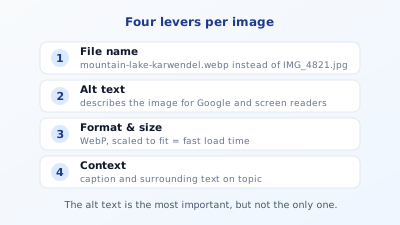
The file name. The name of the image file is a signal too. mountain-lake-karwendel.webp says more than IMG_4821.jpg. Right at upload it pays to give the file a descriptive name with hyphens instead of underscores.
The format and size. This is where image SEO meets load time. A two-megabyte photo displayed at only 400 pixels wide slows the page massively. A modern format like WebP and scaling to the size actually needed make the page faster. Often the largest image on the page is exactly the element that determines load time. Why that affects rankings so directly is covered in the post on load time and Core Web Vitals.
The context. Google also judges an image by what surrounds it. A caption, the surrounding text, and the section heading help the search engine place the image thematically. An image in the wrong content surroundings will be hard to classify even with a perfect alt text.
The delivery. Images that only become visible on scroll should be loaded lazily so they do not slow the first paint. The topmost, most important image, by contrast, is loaded with priority. This distinction is part of a clean technical implementation.
Common mistakes with images
Four patterns show up especially often.
The first is keyword stuffing in the alt text. Out of an attempt to be ranking-relevant comes a list of search terms. That describes nothing, helps no user, and can be rated by Google as manipulation. Describing beats stuffing, always.
The second is an alt text on purely decorative images. Not every image needs a description. A pure ornamental element, a divider, or a background pattern carries no information. Such images get an empty alt text (alt="") so the screen reader skips them instead of pointlessly reading "graphic." An empty alt text here is not a mistake but the right choice.
The third is mass neglect. On large sites grown over years, alt texts are often missing on hundreds of images. A one-off cleanup does not help here, a process does: every new image gets an alt text immediately at upload, and the old ones are worked through by priority, starting with the most important pages.
The fourth is the oversized original image. The camera delivers a photo several thousand pixels wide, and exactly that lands uncut on the page. The browser shrinks it visually but loads the full file size. Before publishing, it is worth looking at the whole picture through a full on-page check, which assesses images alongside load time and the other fields.
So that Google finds your images at all
Even the best alt text is useless if Google never discovers the image. Three things help. First, images should be embedded in normal HTML as <img>, not solely as a CSS background, because pure background images practically never appear in image search. Second, on large image collections an image sitemap or including the image URLs in the existing sitemap pays off, so Google crawls them reliably. Third, the images must be reachable, so not accidentally blocked by robots.txt, which happens more often than expected with outsourced media directories. These three points are the entry ticket at all, before alt text and file name can take effect.
Quick FAQ
Does every image need an alt text? Every content-relevant image, yes. Purely decorative images deliberately get an empty alt text so screen readers skip them. The question is always: does the image carry information a blind user should know?
Should the keyword go in every alt text? Only if it fits naturally into the description. Forced keywords do more harm than good. Describe honestly what is visible, and relevance follows on its own.
How long may an alt text be? A brief sentence, usually five to fifteen words. Longer stories belong in the visible caption, not in the alt attribute.
Does Google image search bring any traffic at all? Depending on the industry, considerably. For recipes, fashion, travel, trades, and products it is a serious source. For pure text topics less so, but rarely zero.
Does the file name really count? Yes, as an additional signal. It is not as important as the alt text, but a descriptive file name costs nothing at upload and helps Google classify the image.
Should I have an AI generate alt texts? As a starting point it can help, to avoid beginning from scratch. But automatically generated descriptions are often too generic ("a person stands outside") and miss the context of your page. Always review the suggestion and adapt it to what is genuinely relevant in the image and its surroundings.
At a glance
A passed alt-text check only means some text is there, not that it is any good. A good alt text describes the image briefly and truthfully, helps blind users, and brings visibility in image search without stuffing keywords. But image SEO goes further: a descriptive file name, a modern format at the right size for load time, a thematically fitting context, and clean delivery. Make these four levers a habit and you gain traffic, speed, and accessibility from one of the most underrated corners of search optimisation. The effort per image is tiny, the difference across a whole website noticeable, precisely because so many competitors skip this area entirely. That turns a neglected corner into another lever for more visibility on Google.