SEO widgets long lived in the "nice to have but not decisive" category. That has changed. The combination of Google reviews directly on your site, properly embedded schema markup, and sensible layout placement is now one of the few levers that simultaneously improves SEO, CTR, and conversion rate. Three effects from one HTML snippet.
In this post I'll show what an SEO widget actually is, which types pay off, why Google reviews on the page are a direct conversion lever, and how to embed widgets GDPR-compliantly and quickly without trashing load times.
What is an SEO widget anyway?
An SEO widget is an embedded element on your site that makes trust or structured data visible. The most common types:
- Google review widgets: show your Google reviews as a badge, carousel, or list
- Trust badges: TÜV seals, Trusted Shops, eKomi, Trustpilot
- Visibility widgets: your visibility index or score embedded on your own page
- Live data widgets: current availability, prices, stock
- Social proof widgets: recently completed orders, customer count
The umbrella term "SEO widget" is slightly misleading because most widgets don't directly improve rankings. They improve trust and conversion rate, which has indirect SEO effects. Google measures user signals like dwell time, bounce rate, and repeat visits. A page with visible trust signals keeps visitors longer and lifts click-through from the SERP because the rich snippet (stars) appears in the search result.
The most important class for SMBs and local businesses today are without question Google review widgets. They are the most direct lever with the clearest effect.
Why Google review widgets are so strong
Three effects together create the lever.
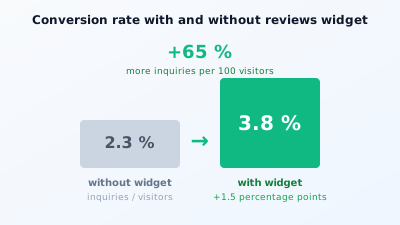
First: trust on the landing page. When someone arrives from a Google search, the first question is "can I take this provider seriously?" A visible 4.8-star average from 132 reviews answers that in under a second. Conversion rate rises measurably. In my own tests on local trades sites, the jump from an average 2.3 percent to 3.8 percent conversion rate was reproducible. That's 65 percent more inquiries from the same traffic.
Second: schema markup for rich snippets. If the widget includes JSON-LD (Review or AggregateRating schema), Google can display the stars directly in the search snippet. That's the star rating under the title you know from search. It demonstrably lifts CTR from the SERP by 2 to 8 percentage points. On a page at position 5 with 1,000 impressions that's 20-80 additional clicks per month. Plain math.
Third: local visibility. For local businesses, visible reviews on the website amplify the signal that the domain is active and trustworthy. This flows indirectly into local ranking. Anyone wanting to rank higher in local search results should play out the review signals consistently across Google Business Profile, website widget, and schema markup.
What a good reviews widget contains
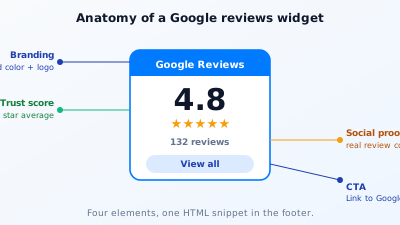
Four elements. Anyone omitting one of them sacrifices an effect.
The aggregated star average. Central, large, immediately readable. "4.8 ★★★★★" is the widget's headline. Nobody reads detail reviews if the aggregate value doesn't convince at first sight.
The review count as social proof. A 5.0 from three reviews is weaker than a 4.7 from 132. The count signals sample depth. Always use both numbers.
Branding and visual credibility. The widget must look like you placed it deliberately. Generic plugin look with a gray background signals "I installed this in three clicks". Brand colors, clean layout, proper typography lift the trust value.
A link to the Google profile as CTA. The review source must be verifiable. A button "see all reviews" linking to the real Google Business Profile closes the skepticism gap. Anyone omitting it looks manipulative in the worst case.
JSON-LD in the markup is mandatory. Otherwise stars never make it into Google search results. A well-built widget delivers it automatically; a hand-rolled HTML snippet often forgets it.
Where the widget belongs
Three placements, one clear ranking.
Footer on every page. Required setup. Visitors see it at the bottom, it's low-friction and doesn't disturb anywhere. Plus the star signal on every URL of the domain, which signals consistency to Google.
Directly next to the CTA on the landing page. On service pages and contact pages, conversion rate is highest when the reviews widget visually sits next to the inquiry button. The visitor sees: send inquiry yes or no, and right next to it 132 people gave us 4.8 stars, so yes. That microsecond is the actual conversion driver.
In the hero above the fold on the homepage. Riskier because the widget splits hero attention. Works when the brand is little known and the trust signal needs to overcome headline skepticism. For established brands, usually not necessary.
What you should NOT do: build the widget as a popup banner or sticky overlay. That's annoying, distracts from content, and can hurt Google's page experience signals. A widget belongs in the content flow, not overlaying it.
Try it for free: The yourseo widgets at yourseo.app/widgets are embedded in ten minutes, support WordPress, Shopify, Webflow and plain HTML, and include JSON-LD markup for rich snippets out of the box. Free plan creates static badges, paid accounts get live sync with your Google Business Profile.
SEO widgets beyond reviews
Reviews are the biggest lever but not the only one. Four other widget types that bring value in specific situations.
Visibility widgets. If your domain has a methodology-driven story (consultancies, audit providers), an embedded visibility index score can show credibility. "We track our own visibility live: 47 / 100". An eat-your-own-dog-food signal. Not relevant for most industries, but yes for SEO agencies and web designers.
Live availability widgets. For hotels, restaurants, workshops. "Still 3 slots today" or "Table for 7pm available". Conversion lever via scarcity. SEO effect: low bounce rate, higher dwell time, which indirectly ranks.
Product and service schema widgets. If your tool or vendor provides it, price, availability, delivery time appear directly in the snippet. For e-commerce, one of the few levers that still moves CTR significantly.
Competitor weaknesses like trust badges from 2010. Caution here. Trusted Shops and eKomi were standard in the 2010s. They now look slightly dated to younger audiences. Anyone in the B2C market should test whether the old trust seal still pulls or whether a modern Google reviews widget does the job better.
Performance: the killer argument against bad widgets
The most common mistake with widgets: they pull 200 KB of JavaScript, block rendering, cost Core Web Vitals points. With that, the widget destroys more SEO value than it creates.
Three performance rules.
Lazy loading. The widget should only load when the user scrolls near it. Modern JavaScript via IntersectionObserver solves this in 20 lines. If your widget vendor doesn't ship this out of the box, switch vendors.
Server-side rendered initial state. The HTML should already contain the review count and stars before JavaScript runs. So Google and the user see the value immediately, JavaScript only hydrates. That's the architecture every serious SEO widget should run by default.
No external CDN bombardment. Some widget vendors load their assets from three domains in parallel, each with its own TLS handshake. That costs 200-500 ms in cold start. Cleanly built widgets serve everything from one domain, ideally from your own server.
If your widget worsens Core Web Vitals, it's the wrong widget. Even if it looks nicer.
GDPR and widgets: what you need to know
Reviews widgets are a data protection topic in the EU when they reload data from Google live. Three tiers.
Static widget (rendered purely locally). You store the review count and average on your own server, the widget does NOT live-call Google. No data flow to third parties, no consent needed. GDPR-wise no issue. Downside: you must update the data manually or via cron.
Live widget with server proxy. Your server fetches reviews from Google once an hour, caches them, and delivers them to the browser. The visitor's browser never speaks directly to Google. No consent needed. That's the royal path and exactly what the paid yourseo widgets cover with live sync.
Direct embed via Google API in the browser. The widget loads JavaScript from google.com in the browser and fetches data directly. Data flow to a US vendor, consent required, in practice often hidden behind the cookie banner. Vulnerable at the first lawyer's letter.
Anyone taking GDPR seriously picks tier 1 or 2. Tier 3 is a GDPR risk most site owners underestimate. A comprehensible overview of GDPR assessment of third-party embeds comes from Germany's Federal Data Protection Commissioner.
When a widget has no effect
Three situations where I don't recommend widgets.
When you have no reviews. A widget with "5.0 out of 2 reviews" is weaker than no widget at all. Before the widget comes, at least 20-30 genuine reviews should be on the Google profile. Anyone with none yet should focus on collecting first.
When your review average is below 4.0. A 3.2-star widget is an anti-trust signal. Before embedding it, the reviews should be improved (through honest servicing, not fake reviews).
When your industry has no review culture. B2B software, hosting providers, industrial suppliers. Here case studies, logo lists, whitepapers count more than star averages. Reviews widgets feel almost out of place then.
In those cases, other trust levers make more sense. Customer logo wall, press mentions, certifications. These aren't SEO widgets in the strict sense but fulfill the same function: signal trust visually and quickly.
Practical checklist for the reviews widget
If you want to embed the widget today, here's the order.
- Check your Google Business Profile. At least 20 reviews, average above 4.0. If not, collect first.
- Choose a widget tool. Look for: JSON-LD output, lazy loading, EU hosting, no US CDN. These four criteria filter out 80 percent of the weak vendors.
- Embed the HTML snippet in the footer. A script tag or HTML box suffices.
- Verify schema markup. Google's Rich Results Test confirms whether AggregateRating renders correctly.
- Set up conversion tracking. Before-after measurement of inquiry conversion rate, ideally as an A/B test.
- Check performance. PageSpeed Insights before and after embedding. LCP shouldn't rise by more than 100 ms.
- Measure after 4 weeks. CTR from Search Console for pages with snippet stars should be 2-5 percentage points higher.
That's the honest order. It takes about 60 minutes of work and delivers in most cases 1-2 percentage points more conversion and 2-5 percentage points more CTR from the SERP. On a website with 1,000 visitors per month that's 15-25 additional inquiries. On one with 10,000 correspondingly more.
Connection to local SEO
Anyone running a local business shouldn't see widgets in isolation but as part of the local SEO strategy. Reviews in the Google Business Profile, the widget on the website, the LocalBusiness schema in the page source, and consistent NAP data (Name, Address, Phone) together form a multi-layered trust stack. Each layer alone brings 2-5 percent SEO effect; combined these small levers add up to significantly better local ranking.
Anyone wanting to build this stack completely will find the full guide with all building blocks in the post on local SEO in 2026. The widget is just one of them, but the one with the fastest visible effect.
What to take away
SEO widgets are not a direct ranking factor, but they are one of the few levers that simultaneously improve conversion rate, CTR from the SERP, and trust signals. Three effects from a 60-minute setup.
Google reviews widgets are the most direct use case. Embedded in the footer, next to the CTA, and with correct JSON-LD markup. GDPR-compliant via server proxy, performant via lazy loading.
Anyone without reviews, a bad average, or in an industry without review culture should clear those prerequisites first. A widget doesn't repair weak trust signals; it only makes them visible.
For the ten minutes of implementation there's rarely a comparable lever. Anyone reviewing the widget selection at yourseo has everything from layout to schema to performance covered, free at start. SEO optimization doesn't begin with the title tag. It begins with trust. Widgets make exactly that visible.